Another Example of "I can't tell if Joe is joking or not".

 Senior Member

Another Example of "I can't tell if Joe is joking or not".
Senior Member
Interesting, however not sure it is practical for an RV as even the smallest one would consume 17KWH of power a day which would require drastically upsizing the solar array.Originally Posted by Joe Camper

I have 3KW of solar panels that are flat mounted (covering fairly much all of my 40ft roof) and peak power seems to be 10am to 2pm at 1800 watts which basically gets me actually topped off by the end of day given my other uses cycling a 8KWH battery pack storage.
I would like to see the links that you have for the home made ones. So far on my first trip to Quartzsite I haven't had the need to run the AC, which could be a water source.
 Senior Member
U tube Fred.
1990 Peterbuilt 377
3406 B Caterpillar
13 Speed Roadranger
No Norgrens
1 day on paper no machines
Senior Member
1980 Prevost Electronic dash upgrade
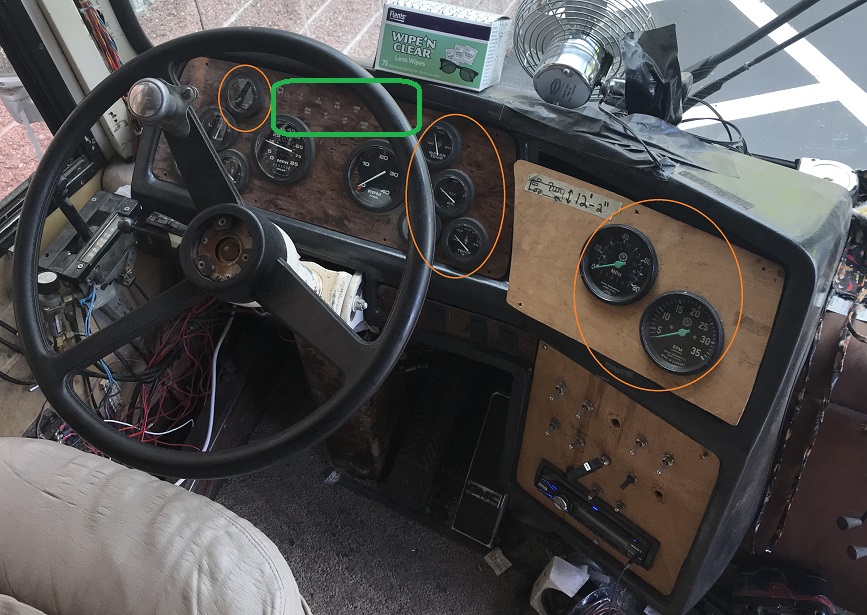
Ok just starting my next major project which is finishing a dash upgrade that a previous, previous owner started on and quit as soon as they had enough gauges to make it drivable.
As you can see in the above picture, only the gauges circled in orange are working and the idiot lights in green which are extremely hard to see.
This is something I have planned on doing for sometime and after experiencing the rats nest of wires that the PO left behind I was considering just making the jump to an electronic dash. Which will save a lot of time on my part.
After meeting Scott from the YouTube channel "This Old Bus" at the BCI rally; who is doing a similar conversion. I finally got kicked into high gear on this and now have a number of items on my bench to start testing/developing a replacement electronic dash solution for my bus.
I have a non-electronic 8V71TA engine in my bus, so the challenge is to get sensors wired up to some form of hub in the engine compartment that then sends out CANBUS messages to be displayed by the electronic dash.
The advantage of a CANBUS solution is that you will only need two wires for a signal data bus through out the vehicle.
If I had DDEC based engine. I would need is a protocol converter of some sort. But since I don't I will not expend any effort on that path.
Still going to maintain the current analog gauges that I now have as a backup.
My current wish list for instrumentation is:
1. Coolant temperature Left and Right banks TA8V71 engine
2. Turbine inlet temperature Left and Right. (Bus has the sensors, but with the half @$# instrument panel upgrade they were omitted.)
3. Engine oil temperature
4. Engine oil pressure
5. Transmission temperature
6. Turbo boost pressure
7. Low coolant level
8. Engine RPM
9. Speedometer
10. Brake system air pressure
11. Idiots lights and other indicators (including low coolant level)
12. Fuel pressure
Last edited by freds; 06-23-2021 at 10:52 PM.
Senior Member
Solar load dumping #1
In my research on the electronic dash replacement.
I stumbled across a YouTube video on a narrow boat where they take excess solar power after the batteries are fully charged and dump the energy into the hot water heater.
They were using a manually controlled variac to soak up the excess solar power and were basically setting a value of 500 watts.
You know those kind of idea's that percolate in your brain and wake up at 1AM?
This is one of them!!!
In my DIY hydronic system I make use a couple RV hot water heaters as my heat storage.
When I am on shore power they cycle between 180 and 120 degrees due to the large hysteria between the high and low points on the temperature switch.
The hotter the hydronic storage temperature the shorter the time period that the toe kick heaters need to be running to heat the bus.
So my idea is going to be to kill two birds with one stone by monitoring the tank temperature (which I am already doing for logging) and turn off the power input just before it reaches maximum temperature so that the temperature switch never triggers.
Plus I can also use it as solar power dump controller to maximize my solar power usage and more and likely have more hot water availability when off grid.
If the automation fails in the off mode, no big deal. If it fails on; then the normal built in switch takes over.
Senior Member
Man cave climate control
The electronic dash project is still soaking up a quite a bit of my time of my tinkering time.
My last post was on solar load dumps.
The heat wave that has been plaguing the western US has finally creped into the Seattle area. So it has gotten hot for us also.
Hey when I am not using the bus there is excess solar production that is going to waste.
My battery pack voltage range is 18 volts to 24 volts with my Tesla house batteries. So I threw into node-red a simple automation flow to:
1. Battery voltage greater than 23V, interior temperature > outside temperature + 10. Turn on the air conditioning.
2. Exterior temperature less then 70 degrees and interior temperature less then exterior turn off air conditioning.
3. Battery voltage less than 22.25 turn off air conditioning.
So with this automation in place I can escape/retreat to the bus/man cave to tinker or watch videos on the big screen OLED TV at any point in time and not walk into a heat soaked bus.
Senior Member
New owner of Vintage Bus 1980, 110 degree heat wave
Ok the whole country heard that we had 110 degree weather here in the pacific northwest this last Monday; with the heat dome that was stuck over us.
Needless to say that it was a challenge with the bus also!!!
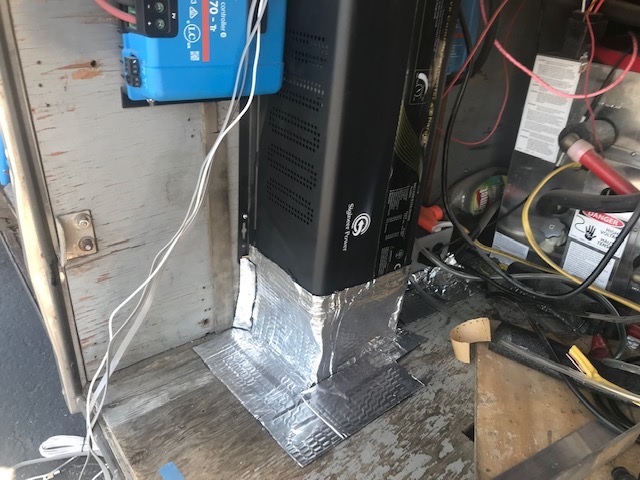
It turns out that when the cooling fan on my inverter comes on; it exhausts air out the bottom of the inverter, which then got sucked back in as it ross; so not much net cooling. Got to say I didn't think ahead about this when I installed the inverter..
So anyway the inverter tripped offline, resulting in no bloody air conditioning!!!
Had I been living in the bus, I would have been headed fast to somewhere I could plug it in to shore power and run the generator in the meantime.
It turns out there is a vent to the outside in the same area of the floor, so I created a duct to force the hot air outside.
To our relief the temperature dropped by 30 degrees on the next day.
PS. My roommates mom who lives in Phoenix AZ, called and asked if she wanted to come for a visit and cool down...
 Senior Member
Why not install a deflector under the bus so the heat being exhausted is directed away from the intake?
Gil and Durlene
2003 H-3 Hoffman Conversion
Senior Member
Repowering laptop
Bus nut's with older buses talk a lot about repowering our buses, this is about repowering my HP Laptop LOL!!!
While I was on my recent trip; I found myself powering up the inverter to then charge up the laptop and other devices. Which I thought was kind of a silly power tax to pay. The biggest goal is avoiding a 80-100 watt overhead to power a 40-75 watt load.
In case you haven't noticed practically everything USB related is in a state of transition to the USB C standard and a lot of devices are switching to USB-C PD (power delivery).
While I could and probably will buy a new laptop at some point in time that accepts USB-C power input directly.
It turns out that are adapter cords out there for some older laptops. Two such cords that I have tested with my HP laptop are:
https://www.amazon.com/gp/product/B0...?ie=UTF8&psc=1
https://www.amazon.com/gp/product/B0...?ie=UTF8&psc=1
An adapter cord works because most laptops accept 19V as their charge voltage.
With the above adapter cords, I recently tested this unit on the 12V input in my bus:
https://www.amazon.com/gp/product/B0...?ie=UTF8&psc=1
This device is also 24V compatible, so I expect no problem running it off of my house battery bank.
Note not all USB-C chargers are created equal!!! There are two basic specifications out there:
- [li]PD 1.0 which supports 5V, 12V and 20V devices[/li]
[li]PD 2.0/3.0 which supports 5V, 9V, 14V and 20V devices.[/li]
However not all devices support all voltages!!! I make extensive use of the following for my home automation system.
https://www.amazon.com/gp/product/B0...?ie=UTF8&psc=1
And it only supports up to 12V out, even when the input power is 24V. So be sure to read the fine print before you buy a USB-C PD power supply!!!
Senior Member
I recommend using a regulated DC to DC to converter when powering electronics. TRC is a source for quality products. https://www.trcelectronics.com/
Gil and Durlene
2003 H-3 Hoffman Conversion
 Posting Permissions

 Reply With Quote