


 DIY Hydronic system heater core's fan change over
Well hey the bus now has heat since I got the zone fans working!!!
The bus was previously setup with each heater outlet having it's own manual fan control switch, can't have that with my automation/smart bus goal LOL!!!
Anyway I decided to change out the old fans with Noctua NF-F12 iPPC-24V-3000RPM Fans.
In the PC world Noctua has a great reputation for quite and long lasting fans. I went with 3000RPM fans for when I need maximum air movement.
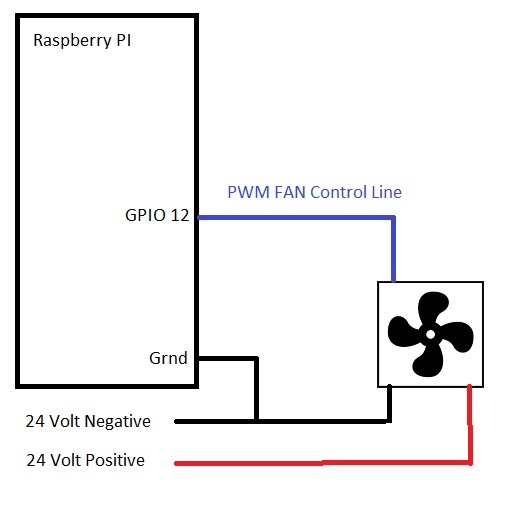
This series of fans have what is called a four wire interface where the fan's speed is controlled with PWM (pulse wave modulation) signal.
The four wire interface has the following wires:
1. Ground
2. Power
3. PWM control
4. RPM feedback signal
I don't use the RPM feedback signal in my configuration.
In my DIY hydronic system I have multiple heat zones in the bus, with control of each zone done by switching the power on/off for the pump and the fan associated with the zone.
My bus automation controller is Raspberry Pi 4 running NodeRed. The Pi has two pins that can be assigned to do PWM under hardware control. However only one pin can be used at a time for PWM.
Given this I currently have the PWM control line shared by the different fans in each zone. I could add separate cheaper Raspberry Pi's and have each zone be adjustable.
The initial NodeRed flow that I created is very simple.
It consists of just three function nodes:
1. Set initial msg.payload on startup to 50 which means 50% fan speed. (Note I took my snapshot after I manually set the speed to 100%.)
2. GUI slider control that allows the user to change the speed on the manual control web page.
3. Generate the PWM signal on the GPIO12 pin.
This is just my starter flow it will get a bit more complex when I add voice control via Alexa. I might also add logic to run the fans at full speed if the delta to the target temperature is greater then ten degrees.
If you are not doing automation you can purchase cheap add on PC fan controllers that you can manually adjust, otherwise when you give these fans power they run at full speed.
Another attribute of Noctua fans is that you can set the PWM duty cycle to zero and the fans turn off. Not something all generic PC fans can do.
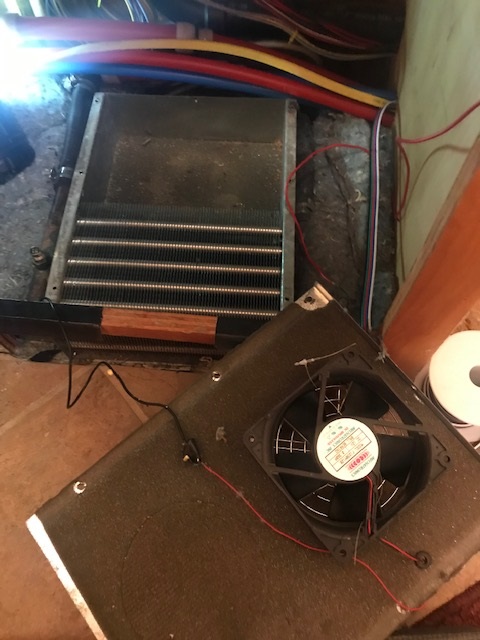
Anyway it was easy to change out the fans. Here's the old fan:
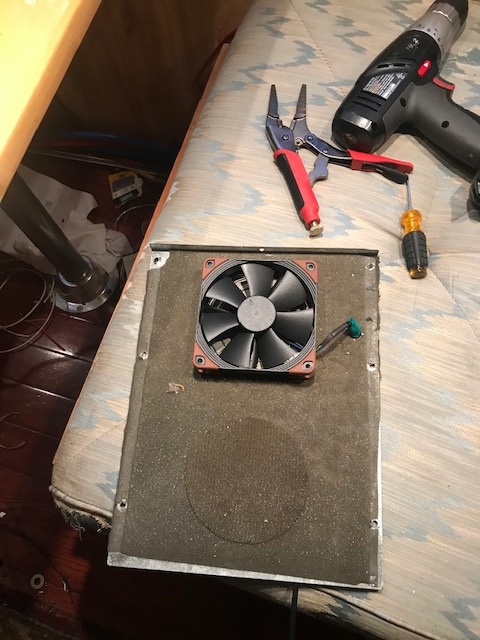
And the new Noctua fan:
Actually this last picture show's me accidently installing the fan backwards, opp's!!!
Test before you close up....


 Reply With Quote
